

How To Add SlashFilm As A Preferred Source On Google
Thanks to some tools offered by Google to allow users to customize their search preferences, you can now let the search engine know which websites you prefer while surfing the web. So, rather than see whatever sites Google happens to be prioritizing that day, you can choose which sites you'd like to see more of. In other words, if you're a fan of SlashFilm and want to see more of our articles while browsing online, Google's Preferred Sources feature is the way to make that happen.
Launched in August of 2025, this customization feature lets users select specific sources that they want to see more from while searching online. Once a source is selected using the Preferred Sources feature, articles from those websites will appear more frequently in the Top Stories section of one's Google feed. So, if you want more SlashFilm in your life, we're going to walk you through how to do that, step by step.
A step by step guide to add SlashFilm as a preferred source
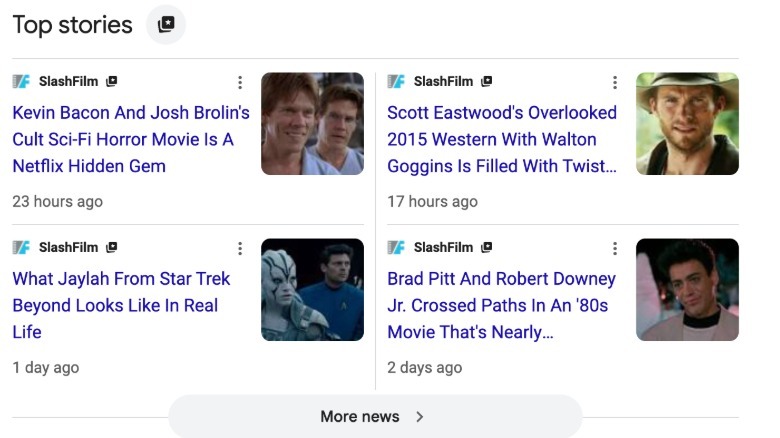
There are two methods that can be used to add SlashFilm to your list of Preferred Sources on Google, and we're going to walk you through both of them. For the first method, open up a search bar in your Google browser. Then type anything you'd like to search for. In this case, something movie or TV related would probably be the way to go. Then, once the search results arrive, there will be a "Top Stories" section at the top of the page.
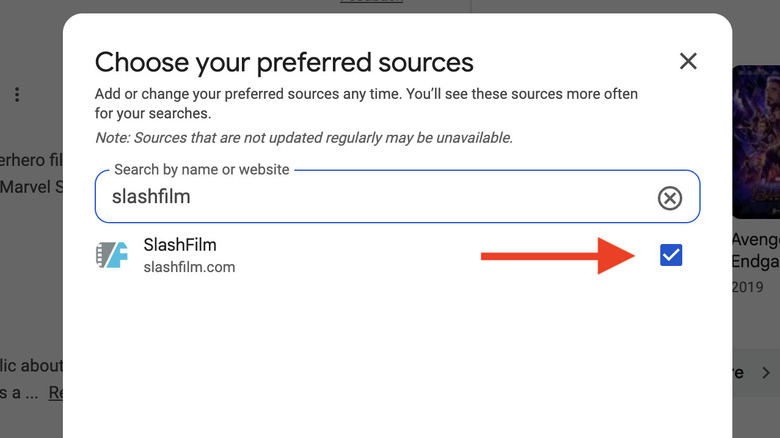
Next to that Top Stories section, as seen in the image below, there is a folder with a star on it. Click on that icon and, at that point, Google will prompt you with a message that reads, "Choose your preferred sources." At that point, you can type in SlashFilm.com and, once it pops up, just check the box to the right and voila, that's all it takes.
The second and maybe easiest is to head to Google.com/Preferences/Source. Once there, simply type SlashFilm.com into the search bar and, same as with the first method, click the check box that comes up next to it, which you can see demonstrated in the above image. Simple as that!
Once either of these methods is used to add SlashFilm to your list of Preferred Sources on Google, the search engine will begin to prioritize our site when search results pop up as you're browsing. After the page is refreshed, you'll begin to see more of our stories showing up in your feed in relevant searches. This allows you to control more of what you encounter online and helps ensure that you never miss a story that you want to see from us in the future.